

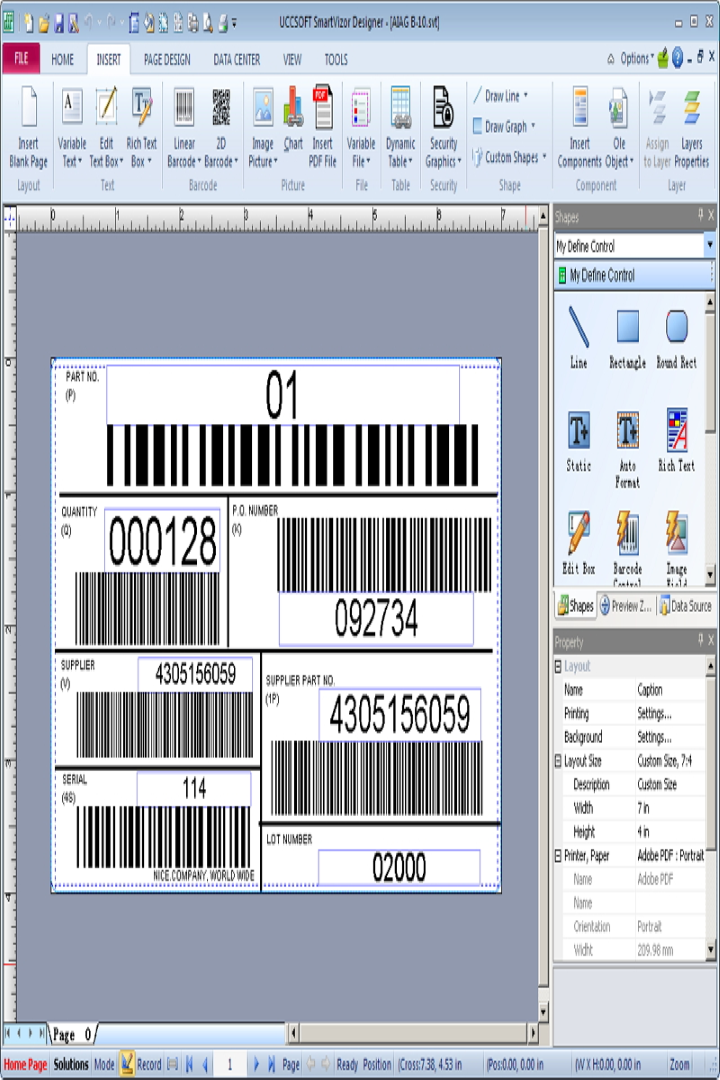
Description
Download SmartVizor Barcode Label Printing Software – barcode label printing, variable barcode printing, database integration, label design, document automation, print management, smart label software, barcode software, label printing tool, label creation software
Overview
SmartVizor Barcode Label Printing Software is a specialized productivity tool designed for businesses requiring efficient and customizable barcode label printing. The application enables users to generate variable barcodes and personalized documents by merging static designs with dynamic data from external databases. This functionality is particularly useful for inventory management, shipping, retail labeling, and internal documentation workflows. By automating the creation of one-to-one labels and documents, SmartVizor reduces manual input errors and accelerates production cycles.
The software is tailored for small to medium-sized enterprises, logistics teams, warehouse operators, and administrative departments that manage high-volume labeling needs. Its affordability, as noted in the product description, positions it as a cost-effective alternative to more expensive enterprise-grade solutions. While the developer, SmartVizor, is identified, no further background information about the company’s history or market presence is available. The application runs exclusively on Windows, indicating its focus on desktop-based business operations rather than mobile environments.
SmartVizor fills a niche in the productivity ecosystem by combining label design, data integration, and print management into a single workflow. For organizations seeking to streamline documentation and labeling processes without investing in complex systems, this software offers a practical and scalable solution. Its ability to interface with various database formats and support a wide range of printers enhances its adaptability across different operational setups.
Key Features & Functionality
- User-Friendly Interface: Designed to be accessible to users with varying technical expertise, the interface allows for intuitive navigation and quick setup of print jobs. Even users without prior experience in label design can create complex layouts through drag-and-drop tools and pre-configured templates.
- Database Integration: The software supports seamless merging of label designs with external data sources such as Excel, CSV, or SQL databases. This enables batch printing of unique barcodes and labels based on real-time data entries, ideal for inventory tracking and order fulfillment.
- Cost-Effective Solution: Positioned as one of the most affordable full-featured variable barcode printing tools, SmartVizor delivers robust capabilities without a premium price tag. This makes it suitable for budget-conscious businesses seeking high-value software without sacrificing functionality.
- Versatile Printing Options: SmartVizor is compatible with virtually any printer model, including thermal, laser, and inkjet devices. This flexibility allows users to switch between hardware setups without reconfiguring the entire workflow, enhancing operational agility.
- Professional Document Creation: Beyond barcode labeling, the software supports the generation of personalized documents such as shipping labels, invoices, and asset tags. This multi-purpose functionality extends its utility across departments, improving cross-functional efficiency.
For example, a warehouse manager can use SmartVizor to pull item details from a database, generate barcoded shipping labels with unique identifiers, and print them directly to a thermal printer—entirely automated. Similarly, a retail operations team can produce custom price tags with embedded barcodes using real-time pricing data, ensuring accuracy and consistency.
Interface, UX & Performance
SmartVizor features a clean, organized interface that prioritizes workflow clarity and task efficiency. The layout is structured around core functions: design canvas, data source panel, preview window, and print settings. This logical arrangement supports a smooth user experience, especially during repetitive or batch printing tasks.
Navigation is straightforward, with contextual menus and toolbars that minimize the need for deep menu dives. The drag-and-drop functionality for placing barcode elements and text fields simplifies the design process, reducing the learning curve for new users. Although the developer did not list formal performance metrics, the application is designed to handle moderate to large data sets efficiently, suggesting optimized memory and processing usage.
Responsiveness is consistent across different Windows configurations, and stability appears reliable during extended printing sessions. The software maintains consistent output quality, with no reported issues related to print alignment, resolution, or data corruption. While specific device compatibility details were not disclosed, the application is built to function on standard Windows desktop and laptop systems.
Platform Compatibility & Technical Requirements
SmartVizor Barcode Label Printing Software is designed exclusively for the Windows operating system. The current version is 1.0.0.3, with a file size of 24.5 MB, indicating a lightweight installation that requires minimal disk space. The developer did not specify minimum OS requirements, such as Windows 10, 11, or specific architecture (x64/x86).
Given its size and purpose, the software is likely optimized for modern Windows environments, but users should verify compatibility with their system before installation. The absence of mobile or cloud-based availability suggests that SmartVizor is intended for desktop use within controlled business environments. No additional dependencies or runtime frameworks were mentioned in the provided data.
Pros and Cons
Pros
- Cost-effective pricing for a full-featured variable barcode printing solution
- Intuitive interface suitable for non-technical users
- Strong database integration for dynamic label generation
- Wide printer compatibility across various hardware types
- Supports both barcode labels and personalized document creation
Cons
- Platform limited to Windows; no support for macOS or mobile devices
- Specific system requirements were not disclosed
- Not available as a cloud-based or subscription service
- No built-in collaboration or version control features
- Developer did not provide detailed documentation or tutorials
FAQ
Is SmartVizor compatible with all types of printers?
Yes, the software supports printing on virtually any printer model, including thermal, laser, and inkjet devices, as long as the printer is recognized by the Windows operating system.
Can I use my own database with SmartVizor?
Yes, SmartVizor allows integration with various database formats such as Excel, CSV, and SQL databases, enabling users to pull data for variable label printing.
Is SmartVizor safe to download and install?
As long as the software is downloaded from the official developer website or trusted sources, it is considered secure. Users should avoid third-party sites that may bundle unwanted software.
Does SmartVizor offer updates?
While the developer did not specify update frequency, the software is available in version 1.0.0.3, indicating ongoing development and support.
Can I use SmartVizor on multiple computers?
The licensing terms were not provided. Users should consult the official documentation or developer for details on multi-device usage rights.
Final Thoughts
SmartVizor Barcode Label Printing Software stands out as a practical, budget-friendly tool for businesses that require reliable variable barcode printing and document automation. Its combination of user-friendly design, database integration, and broad printer support makes it a strong choice for teams managing inventory, shipping, or labeling workflows. While it is limited to Windows and lacks cloud capabilities, its core functionality delivers significant value for desktop-based operations.
For small to mid-sized enterprises seeking an efficient, one-time-purchase solution without complex subscriptions or high costs, SmartVizor offers a compelling balance of features and affordability. The software empowers users to automate repetitive tasks, reduce errors, and improve documentation accuracy.
Download SmartVizor now
Guides & Tutorials for SmartVizor Barcode Label Printing Software
How to install SmartVizor Barcode Label Printing Software
- Click the Preview / Download button above.
- Once redirected, accept the terms and click Install.
- Wait for the SmartVizor Barcode Label Printing Software download to finish on your device.
How to use SmartVizor Barcode Label Printing Software
This software is primarily used for its core features described above. Open the app after installation to explore its capabilities.
User Reviews for SmartVizor Barcode Label Printing Software 0
No reviews found


